Controlling Arduino Hardware from n8n — Including from an AI Agent The Arduino UNO Q is a small Linux board with a co-processor microcontroller — think a Raspberry Pi and an Arduino Uno welded together, with a software ...
Controlling Arduino Hardware from n8n — Including from an AI Agent
The Arduino UNO Q is a small Linux board with a co-processor microcontroller — think a Raspberry Pi and an Arduino Uno welded together, with a software bridge between them. It runs Docker. It runs n8n. And it has an on-board MCU that can read sensors, drive GPIO, and talk to I²C devices.
The obvious question, once you have n8n running on the Q, is: can n8n workflows talk to the MCU directly? Read a temperature sensor, flip a relay, react when a button is pressed?
The less obvious question — but the one that made this project actually interesting — is: can an LLM talk to the MCU as a tool? Can you drop a "read temperature" node onto an AI Agent's tool port and let the model decide when to sample it, chain the result with a database lookup, and then decide whether to turn on a fan?
The answer to both is yes. Here is how we got there, what we built, and what we learned along the way.
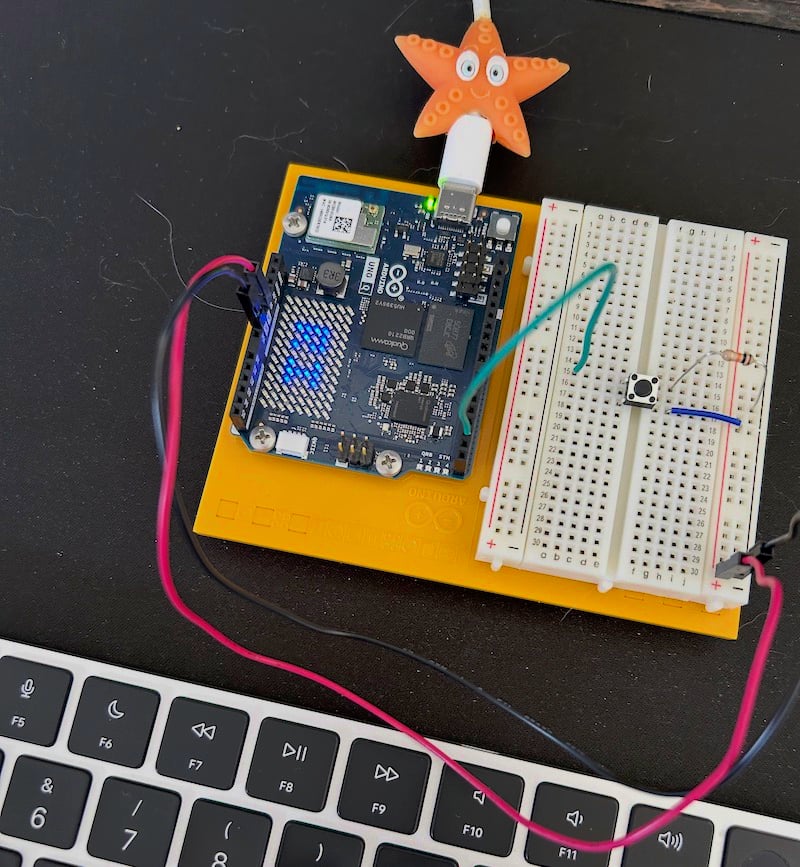
The hardware: Arduino UNO Q and arduino-router
The UNO Q runs a Go service called arduino-router as a systemd daemon. The router is a MessagePack-RPC hub: it sits between the Linux environment and the MCU's serial port, and routes method calls in both directions. Any process on the Linux side — a container, a script, an App Lab app — can connect to its Unix socket at /var/run/arduino-router.sock and speak standard MessagePack-RPC.
The socket is world-writable (0666), so containers don't need privilege escalation. You bind-mount it with -v /var/run/arduino-router.sock:/var/run/arduino-router.sock and you're in.
The Arduino team provides a Python client (arduino_app_bricks.Bridge) as the reference implementation. It works fine if Python is your runtime. We wanted Node.js.
The naïve approach we didn't take
The first thing you might reach for is a Python sidecar: spin a container that wraps Bridge.call() in a small HTTP/TCP server, then have n8n call that over the network. This is exactly what UNOQ_DoubleBridge does for Node-RED — a Python TCP proxy that relays RPC calls.
We rejected this. One extra container to ship, configure, and monitor. Two network hops instead of one. And — critically — async events from the MCU (a button press, a heartbeat, an interrupt flag) become much harder: you'd need the Python sidecar to forward them over a second protocol, probably polling or a persistent HTTP connection. That's complexity with no upside.
Arduino staff confirmed on the forum that the right path is to implement the MessagePack-RPC client in Node.js directly: "you need to implement an interface to the arduino-router in node.js the same way the bridge.py script does." So we did.
Package 1 — @raasimpact/arduino-uno-q-bridge
The first package is a pure Node.js client for arduino-router. No n8n dependency. The only external dependency is @msgpack/msgpack. License: MIT.
The MessagePack-RPC protocol is simple: requests are [0, msgid, method, params], responses are [1, msgid, error, result], and notifications are [2, method, params]. What's not obvious is that the router sends raw msgpack values back-to-back with no length prefix — so you need a streaming decoder that reads one value at a time from the socket buffer.
The public API covers what you actually need:
import { Bridge } from '@raasimpact/arduino-uno-q-bridge';

const bridge = await Bridge.connect({ socket: '/var/run/arduino-router.sock' });

// Outbound — router forwards to whoever registered this method on the MCU
const answer = await bridge.call('read_temperature', []);

// Inbound — register ourselves as the handler of a method
await bridge.provide('ask_llm', async (params, msgid) => {
  // MCU called us; return a computed response
  return { answer: await queryModel(params[0]) };
});

// Inbound notifications (fire-and-forget from MCU)
bridge.onNotify('button_pressed', (params) => console.log('pressed', params));
Under the hood: a monotonic msgid counter with in-flight requests in a Map, a 5-second default timeout per call, exponential-backoff reconnect (configurable), and automatic re-registration of all provide and onNotify subscriptions on reconnect. A typed error hierarchy (BridgeError, TimeoutError, ConnectionError, MethodNotAvailableError) makes error handling in workflows explicit.
We validated the full stack against a real UNO Q via SSH-tunneled socket before writing a line of n8n code: raw msgpack smoke test, then the full integration suite with the test sketch flashed on the board. Tests cover $/version, RPC round-trips, NOTIFY delivery, array-typed params, and async MCU events (heartbeat arriving within 7 seconds, interrupt-driven gpio_event).
Package 2 — n8n-nodes-uno-q: four nodes
The n8n community package exposes four nodes. Three are straightforward; the fourth is where things get interesting.
Arduino UNO Q Call is an action node: you give it a method name and a parameters array, it calls the MCU via the bridge, and emits the response. The MCU equivalent of an HTTP Request node.
Arduino UNO Q Trigger listens for inbound calls or notifications from the MCU and fires a workflow. It has two sub-modes: Notification (fire-and-forget, multiple triggers can share a method) and Request (the router holds the RPC connection open until the workflow responds). Multiple active workflows can all listen for the same notification — the bridge deduplicates the $/register call internally and fans out to all handlers.
Arduino UNO Q Respond is the companion to Trigger's Request mode: it closes the pending RPC response with a workflow-computed value. Same pattern as n8n's "Respond to Webhook" node, just over the router socket instead of HTTP. This makes workflows like "MCU asks for a config value → n8n queries a database → MCU gets the answer" possible without polling.
Arduino UNO Q Method is where the project gets interesting.
The interesting part: an LLM that can touch hardware
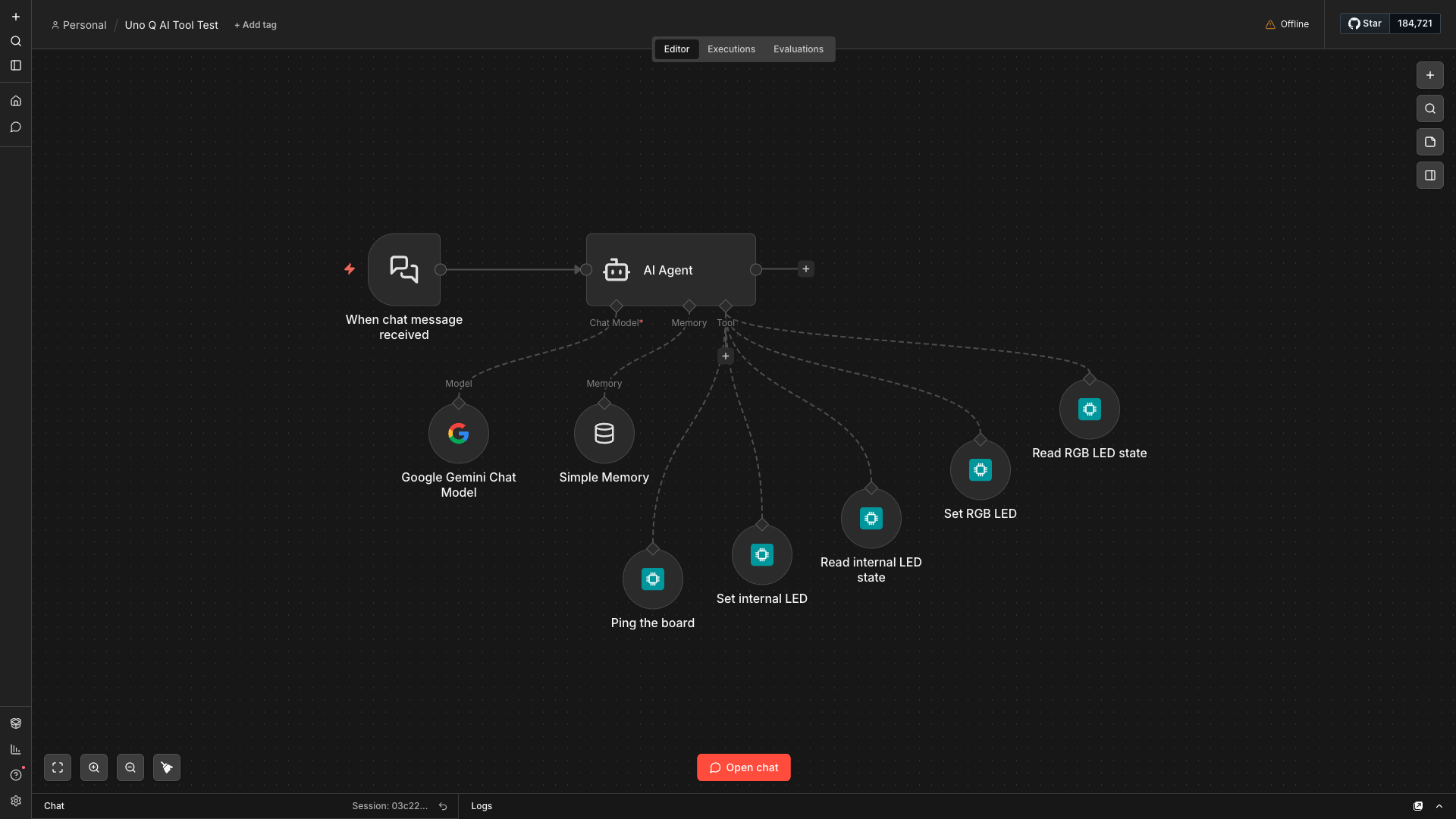
n8n's Tools AI Agent can call any node connected to its Tool port as a tool during inference. The model sees the tool's name and description, decides whether to call it, fills in the parameters, and acts on the result — all autonomously, in a loop, until it has an answer.
The Arduino UNO Q Method node is exactly this: a node with usableAsTool: true that exposes one MCU method to the agent. You configure the method name, a plain-English description the LLM reads, and the parameter schema. Drop it on the Agent's Tool port. Now the LLM can decide to call read_temperature, evaluate the result, and decide whether to call set_fan_speed — expressed in natural language, resolved by the model choosing the right tools.
One node per MCU method is a deliberate design choice, not a lazy one. It gives you human-in-the-loop granularity at the connector level (n8n lets you gate approval on individual tool connections), canvas visibility (reviewers see exactly what the agent can do), and error isolation. It also matches the idiom of every maintained n8n community tool package.
What we learned the hard way: community packages and tool nodes
n8n has two ways a node can appear as a tool to an AI Agent. The stock @n8n/nodes-langchain packages (ToolCode, McpClientTool, ToolHttpRequest) use supplyData with an AiTool output — a sub-node with no execute method. Community packages cannot use this pattern.
We discovered this the hard way. An earlier implementation copied the ToolCode pattern, built cleanly, and then threw "has a 'supplyData' method but no 'execute' method" at runtime. The fix is usableAsTool: true on a regular Main→Main node with a standard execute() method. n8n auto-wraps it into a LangChain DynamicStructuredTool when connected to an Agent's Tool port. This is confirmed by n8n PR #26007 and by every community tool package on npm that actually works.
You also need N8N_COMMUNITY_PACKAGES_ALLOW_TOOL_USAGE=true on the n8n process — it's not on by default.
The singleton design problem
arduino-router rejects a second $/register for the same method name. In n8n, multiple active workflows might try to register button_pressed simultaneously. And creating a fresh socket per workflow activation is wasteful.
The solution is a process-wide BridgeManager singleton with reference counting: the first trigger to use a socket path creates the Bridge; subsequent ones get the same instance. When the last trigger deactivates and the refcount hits zero, the socket closes and the router drops all registrations automatically.
There is one non-obvious trap here. n8n's "Listen for test event" calls a trigger's closeFunction before running the downstream workflow with the captured event. If the Trigger is in deferred-response mode and the closeFunction tries to drain in-flight handlers synchronously, you get a deadlock: the workflow can't reach the Respond node until closeFunction returns, and closeFunction is waiting for a Promise that only resolves when Respond runs. The fix is to fire-and-forget the drain — return synchronously from closeFunction, let the handler finish in the background, then close the socket. Simple once you see it; not obvious until the 30-second MCU timeout fires and you're reading the error logs at midnight.
One important caveat: the singleton is per-process. n8n's queue mode with separate worker processes breaks the assumption. This is documented as a v1 limitation.
A note on safety — especially in Europe
Letting an LLM decide when to fire a relay or override a thermostat is a different category of risk from letting it write a draft email. The EU AI Act classifies AI systems based on the risk of their outputs to health, safety, and fundamental rights. A system that can actuate physical hardware — even indirectly, through n8n workflows — warrants explicit consideration of where human oversight sits.
n8n's human-in-the-loop feature, configurable at the agent↔tool connector level, maps directly to this requirement. For any Method node whose MCU method changes physical state — set_motor_speed, open_valve, disable_alarm — the default posture should be to require approval before the call executes. Read-only methods (read_temperature, get_led_state) can reasonably run without a gate.
This isn't just a compliance concern. The practical risk is an LLM misreading context and calling an actuator method at the wrong time. Strict parameter validation in the node, narrow and action-specific tool descriptions (so the model picks the right tool), and a conservative human-review default for state-changing methods are all mitigations worth wiring in from the start.
More control for the agent: Method Guard, Rate Limit, and idempotent retry
After the initial release, three capabilities were added to the UnoQMethod node that address a pattern we kept running into: an agent that sometimes does too much, too aggressively, or at the wrong time.
Method Guard is a small JavaScript predicate you write directly in the node. It runs before every call reaches the MCU, with method and params in scope. Return true to allow. Return a string to reject — and the LLM reads that string and can self-correct on the next iteration. This is the right place for range checks (if (params[0] > 100) return "speed must be ≤ 100"), time-of-day gates, or external-state checks (if (systemLocked) return "system is in maintenance mode — do not actuate").
Rate Limit is a sliding-window cap on how many times the agent can call a given method per minute, hour, or day. Excess calls short-circuit without touching the MCU and return a retry-in-N-seconds message the LLM reads. A budget object is also available inside the Method Guard scope — budget.remaining, budget.used(window), budget.resetsInMs — for soft-cap patterns that warn before hitting the hard limit.
Idempotent retry addresses the inverse problem: what happens when the socket drops mid-call and it's unclear whether the MCU received the request? The bridge's callWithOptions method now accepts an idempotent flag. When set, the bridge re-issues the call once the connection recovers — but only for operations where repeating produces the same outcome: an absolute write (set_valve(closed)), a pure read. Relative moves (move_stepper(+100)) should never be marked idempotent. The flag is surfaced as a checkbox on the UnoQCall and UnoQMethod nodes so you set the policy once at design time.
Reaching a Q that isn't local: three relay variants
The original bridge assumed n8n and the Q were on the same host — a reasonable starting point, since the Q is designed to run n8n itself. But it rules out a common deployment: n8n running centrally, orchestrating one or more Qs scattered across different sites or behind NAT routers.
The transport layer was refactored into a formal abstraction and surfaced as a credential type in the n8n nodes. Each credential represents one Q, and the transport dropdown has four values:
Unix socket is the original path, unchanged. Use it when n8n and the Q share a host.
TCP (plain) adds a socat-based relay container (deploy/relay/) that binds a port on the Q and proxies raw bytes to the router socket. Suitable for trusted LANs where the network is already controlled.
TCP + mTLS adds a stunnel relay (deploy/relay-mtls/) that terminates mutual TLS — both sides present certificates signed by a CA you control. The bundled PKI wrapper handles setup: ./pki add device <nick> for the Q side, ./pki add n8n <nick> for the n8n side. Use this when the path between n8n and the Q crosses an untrusted network.
SSH relay is the NAT traversal case, added to handle Qs that can't accept inbound connections. The Q dials out to n8n using autossh and a reverse-forwarded channel. n8n hosts a small embedded SSH server that receives the connection and routes it to the right bridge instance by device nickname. No inbound firewall rules are needed on the Q. Authentication uses OpenSSH user certificates signed by a single CA — no per-device secrets to distribute. PKI commands mirror the other variants: ./pki setup, ./pki add device <nick>, ./pki add n8n <nick>.
A workflow that orchestrates multiple Qs uses multiple credentials — one per Q — and the BridgeManager maintains separate pooled connections keyed by transport descriptor. The refcounting and auto-reconnect logic that applied to the local socket applies identically to every transport variant.
A third package: n8n-nodes-arduino-cloud
Not every Arduino project uses a local UNO Q. Arduino also offers a hosted cloud platform — Arduino Cloud — where device properties are stored and accessible over REST and MQTT. Some teams are already there; others are running both local and cloud-connected devices in the same workflows. Either way, it's a different integration surface, and it deserved its own package.
n8n-nodes-arduino-cloud is completely disjoint from the UNO Q packages: separate credential, separate wire protocols, no shared code. The two packages can run side by side in the same n8n instance.
The Arduino Cloud action node supports three operations on device properties: Get (current value), Set (publish a new value), and Get History (time-series window with configurable start/end). The node is marked usableAsTool: true, so it connects directly to an AI Agent's Tool port — same pattern as UnoQMethod, same canvas idiom. It carries the same safety primitives: a Property Guard predicate and a Rate Limit per (node, thingId, propertyId, operation). Per-credential request throttling respects Arduino Cloud's 10 req/s API limit automatically.
The Arduino Cloud Trigger node subscribes to a device property over MQTT-over-WebSocket and fires a workflow on every value change. Multiple trigger nodes sharing a credential share a single MQTT connection — the same refcounting pattern used by BridgeManager, applied to a CloudClientManager instead.
OAuth2 client credentials (Client ID + Secret from your Arduino Cloud Space settings) are cached with pre-expiry refresh and request coalescing, so token churn doesn't surface as transient errors under concurrent workflow activations.
Where things stand at v0.4.0
Three packages are published on npm. @raasimpact/arduino-uno-q-bridge and n8n-nodes-uno-q are at v0.4.0. n8n-nodes-arduino-cloud is at v0.1.1, published independently.
Setup for the local UNO Q path is the same as it was at launch: grab the compose file, docker compose up -d, install n8n-nodes-uno-q from Settings → Community Nodes. For remote Qs, pick the relay variant that matches your network topology — plain TCP, mTLS, or SSH — and follow the PKI setup in the corresponding deploy/relay-*/ directory. For Arduino Cloud, install n8n-nodes-arduino-cloud, create an OAuth2 API credential, and point the node at your Thing.
All source code is in the same repository: GitHub.
The pattern that has held up across all of this — wrapping hardware RPC as LLM tools with safety predicates at the node level — turns out to be the useful primitive. Every time we've built a workflow where an agent can touch physical state, the question is the same: what does this tool need to refuse, and when? Answering that at the node level, before the call leaves n8n, is cleaner than handling it inside the MCU sketch or in a downstream safety wrapper.
Building AI workflows that interact with real hardware?
We work with companies integrating AI agents into operational environments — from sensor networks to ERP-connected automation. If you're evaluating what a proof of concept looks like for your setup, let's talk.
Start the conversation →